
Customization
Colors can be overridden by setting CSS variables.
Each component has a set of tokens that are needed for full customization of the component and its states (hover, selected, active etc.).
The exposed CSS variables follow this structure:
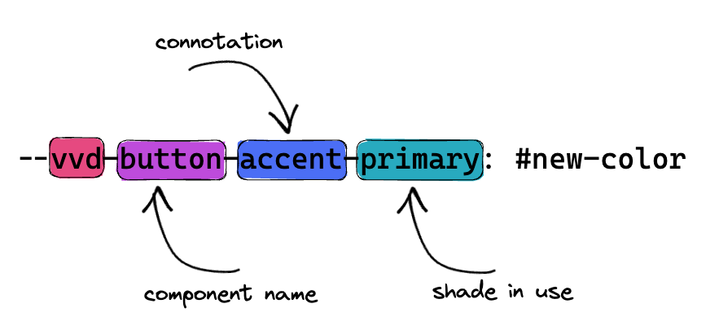
Vivid is using a naming scale for all connotations that are in use in the components.
--var-color-50
faint, backdrop
--var-100
soft
--var-200
dim
--var-300
pale
--var-400
light
--var-color-500
primary, intermediate
--var-color-600
firm, primary-increment
--var-color-700
fierce
--var-color-800
contrast
--var-color-canvas
primary-text
Below you can find the list of components with their exposed CSS variables for their respective connotations. Click on “Edit code” to be able to modify the variables.
<vwc-accordion expand-mode="multi"> <vwc-accordion-item heading="Accordion item with heading"> Lorem Ipsum is simply dummy text of the printing and typesetting industry. </vwc-accordion-item></vwc-accordion><vwc-action-group> <vwc-button aria-label="Undo"> <vwc-icon slot="icon" name="reply-line"></vwc-icon> </vwc-button> <vwc-button label="copy"></vwc-button> <vwc-button label="paste"></vwc-button> <vwc-button label="submit"></vwc-button></vwc-action-group><vwc-alert connotation="$CONNOTATION" text="What an important info!!!" open> <vwc-icon slot="icon" name="megaphone-solid"></vwc-icon></vwc-alert><vwc-avatar connotation="$CONNOTATION" appearance="filled"></vwc-avatar><vwc-avatar connotation="$CONNOTATION" appearance="duotone"></vwc-avatar><vwc-avatar connotation="$CONNOTATION" appearance="outlined"></vwc-avatar><vwc-badge connotation="$CONNOTATION" text="filled" appearance="filled"></vwc-badge><vwc-badge connotation="$CONNOTATION" text="subtle" appearance="subtle"></vwc-badge><vwc-badge connotation="$CONNOTATION" text="duotone" appearance="duotone"></vwc-badge><vwc-banner connotation="$CONNOTATION" text="Here's some information that you may find important!"></vwc-banner><vwc-button connotation="$CONNOTATION" label="ghost" appearance="ghost"></vwc-button><vwc-button connotation="$CONNOTATION" label="filled" appearance="filled"></vwc-button><vwc-button connotation="$CONNOTATION" label="outlined" appearance="outlined"></vwc-button><vwc-calendar> <vwc-calendar-event connotation="$CONNOTATION" appearance="filled" heading="filled" slot="day-0"></vwc-calendar-event> <vwc-calendar-event connotation="$CONNOTATION" appearance="subtle" heading="subtle" slot="day-1"></vwc-calendar-event></vwc-calendar><vwc-checkbox label="A default checkbox"></vwc-checkbox><vwc-combobox> <vwc-option text="First Option"></vwc-option> <vwc-option text="Second Option"></vwc-option></vwc-combobox><vwc-fab connotation="$CONNOTATION" label="Add to cart"> <vwc-icon slot="icon" name="cart-line"></vwc-icon></vwc-fab><vwc-menu open> <vwc-menu-item text="Menu item 1" text-secondary="secondary text"></vwc-menu-item> <vwc-divider></vwc-divider> <vwc-menu-item control-type="checkbox" text="Checkbox 1"></vwc-menu-item> <vwc-menu-item control-type="checkbox" text="Checkbox 2"></vwc-menu-item> <vwc-divider></vwc-divider> <vwc-menu-item control-type="radio" text="Radio 1.1"></vwc-menu-item> <vwc-menu-item control-type="radio" text="Radio 1.2"></vwc-menu-item> <vwc-divider></vwc-divider> <vwc-menu-item control-type="radio" text="Radio 2.1"></vwc-menu-item> <vwc-menu-item control-type="radio" text="Radio 2.2"></vwc-menu-item></vwc-menu><vwc-nav> <vwc-nav-item href="#" text="1st level item" onclick="onClick(event)" current></vwc-nav-item> <vwc-nav-item href="#" text="1st level item" onclick="onClick(event)"></vwc-nav-item> <vwc-nav-item href="#" text="1st level item" onclick="onClick(event)"></vwc-nav-item></vwc-nav><script> function onClick(event) { currentNavItem = document.querySelector('vwc-nav-item[current]'); currentNavItem?.removeAttribute('current'); event.currentTarget.setAttribute('current', ''); }</script><vwc-nav> <vwc-nav-disclosure label="1st level item"> <vwc-nav-item href="#" text="2nd level item"></vwc-nav-item> </vwc-nav-disclosure> <vwc-nav></vwc-nav></vwc-nav><vwc-nav> <vwc-nav-item href="#" text="Account" onclick="onClick(event)"></vwc-nav-item> <vwc-nav-item href="#" text="Shop" onclick="onClick(event)" current></vwc-nav-item> <vwc-nav-item href="#" text="My Cart" onclick="onClick(event)"></vwc-nav-item></vwc-nav>
<script> function onClick(event) { currentNavItem = document.querySelector('vwc-nav-item[current]'); currentNavItem?.removeAttribute('current'); event.currentTarget.setAttribute('current', ''); }</script><vwc-note connotation="$CONNOTATION" headline="Pascal's theological argument"> <vwc-icon slot="icon" name="check-circle"></vwc-icon> Pascal argues that a rational person should live as though God exists and seek to believe in God. If God does not actually exist, such a person will have only a finite loss (some pleasures, luxury, etc.), whereas if God does exist, he stands to receive infinite gains (as represented by eternity in Heaven) and avoid infinite losses (eternity in Hell).</vwc-note><vwc-listbox> <vwc-option text="Option"> <vwc-icon slot="icon" name="chat-line"></vwc-icon> </vwc-option></vwc-listbox><vwc-progress connotation="$CONNOTATION" min="0" max="50" value="12.5"></vwc-progress><vwc-progress-ring connotation="$CONNOTATION"></vwc-progress-ring><vwc-radio label="A default radio"></vwc-radio><style> vwc-select { width: 150px; }</style><vwc-select label="choose one option"> <vwc-option value="1" text="Option 1"></vwc-option> <vwc-option value="2" text="Option 2"></vwc-option> <vwc-option value="3" text="Option 3"></vwc-option></vwc-select><vwc-switch connotation="$CONNOTATION"></vwc-switch><style> vwc-tab[aria-selected='true'] { --vvd-tabs-accent-primary: var(--vvd-color-announcement-500); --vvd-tab-accent-primary: var(--vvd-color-announcement-500); --vvd-tab-accent-faint: var(--vvd-color-announcement-50); }</style><vwc-tabs activeid="apps" gutter="none"> <vwc-tab label="Appetizers" id="apps"></vwc-tab> <vwc-tab label="Entrees" id="entrees"></vwc-tab> <vwc-tab label="Desserts" id="desserts"></vwc-tab> <vwc-tab-panel id="appsPanel"> <ol> <li>Stuffed artichokes</li> <li>Bruschetta</li> <li>Oven-baked polenta</li> <li>Salami and Fig Crostini with Ricotta</li> <li>Rosemary-Potato Focaccia with Goat Cheese</li> </ol> </vwc-tab-panel> <vwc-tab-panel id="entreesPanel"> <ol> <li>Mushroom-Sausage Ragù</li> <li>Tomato Bread Soup with Steamed Mussels</li> <li>Grilled Fish with Artichoke Caponata</li> <li>Celery Root and Mushroom Lasagna</li> <li>Osso Buco with Citrus Gremolata</li> </ol> </vwc-tab-panel> <vwc-tab-panel id="dessertsPanel"> <ol> <li>Tiramisu</li> <li>Spumoni</li> <li>Limoncello and Ice Cream with Biscotti</li> </ol> </vwc-tab-panel></vwc-tabs><vwc-tag-group> <vwc-tag connotation="$CONNOTATION" label="subtle" appearance="subtle"></vwc-tag> <vwc-tag connotation="$CONNOTATION" label="duotone" appearance="duotone"></vwc-tag></vwc-tag-group><vwc-text-area label="Helper text below" helper-text="Help text" placeholder="My Placeholder"></vwc-text-area><vwc-text-field label="Helper text below" helper-text="Help text" placeholder="My Placeholder"></vwc-text-field><vwc-tree-view> <vwc-tree-item text="Tree Item"> <vwc-icon slot="icon" name="chat-line"></vwc-icon> </vwc-tree-item></vwc-tree-view>